APA POS SDK
Integrate APA payment terminals into your point-of-sale application with the APA Terminal SDK. The SDK provides payment processing, transaction status queries, reversals, shift management, and terminal administration through a Java-compatible API.
The SDK is implemented in Kotlin and distributed as a JAR for Java and Kotlin applications. It requires JDK 17 or newer and access to an APA terminal service.
See the docs/README.md for visual walkthroughs of the integration flows.
Contents
#building-from-source
#quick-start
#configuration
#connection-configuration
#logger
#terminal-operations-overview
#terminal-state
#shift-lifecycle
#cashier-display-updates
#payment-requests
#staged-payments
#confirming-or-rolling-back-a-staged-transaction
#handling-the-outcome
#payment-cancellation
#payment-recovery
#reversal--multiple-reversal
#manual-pan-key-entry-mpke
#early-check-in
Building from source
.\gradlew.bat buildProduces build/libs/apa-sdk-<version>.jar. Requires JDK 17 or newer at runtime.
Runtime dependencies include kotlinx-serialization-json and the Kotlin standard library. Include their transitive dependencies when integrating the JAR into your application. HTTP communication uses the JDK HTTP client.
On macOS or Linux, use ./gradlew in place of .\gradlew.bat.
Quick start
Java (types are in com.abrantix.apa.sdk; replace the connection values for your environment):
Terminal terminal = Terminal.builder()
        .ep2TerminalId("30189069")
        .posId("101")
        .withConnectionOptions(RemoteConnectionOptions.builder()
                .url("https://terminal-service.example.com")
                .tenantId("tenant-1")
                .clientId("my-service")
                .clientSecret("my-secret")
                .tokenUrl("https://auth.example.com/realms/apa/protocol/openid-connect/token")
                .build())
        .build();

terminal.connect();
terminal.activate(new ActivateData("101"));

Amount amount = new Amount(1000, "CHF");
TransactionRequest request = TransactionRequest.purchase().amount(amount).build();
TransactionStep step = terminal.transactionStart(request);

switch (step.getType()) {
    case RESULT -> System.out.println(((TransactionResult) step).getStatus());
    case AUTH -> throw new IllegalStateException("Unexpected manual commit step");
}Create one Terminal instance per physical terminal at application startup and reuse it. Instances are thread safe; coordinate payments so only one transaction runs on a physical terminal at a time. ep2TerminalId(...) scopes the client to a physical EP2 terminal up front; withConnectionOptions(...) is the only way to supply the base URL, tenant ID and access token (see #configuration) - there is no shorthand that sets these individually. TerminalOptions.builder().charactersPerLine(...) is accepted for forward compatibility but not yet used by this SDK version.
transactionStart(...) blocks the calling thread until the terminal answers, which can take up to several minutes - see #staged-payments for the full TransactionStep/AuthStep/TransactionResult shape, including autoCommit = false.
For production, persist an application-generated correlation ID before starting a payment and pass it to the call. Handle communication failures as described in #payment-recovery.
Configuration
Terminal.builder() identifies the physical terminal, how to reach it, the per-instance listeners, and the executor. Everything else - timeouts and receipt options - is bundled into a TerminalOptions value object built separately via TerminalOptions.builder() and attached with .terminalOptions(...):
TerminalOptions options = TerminalOptions.builder()
        .commitTimeout(Duration.ofSeconds(30))
        .build();

Terminal terminal = Terminal.builder()
        .ep2TerminalId("30189069")
        .posId("101")
        .withConnectionOptions(connectionOptions)
        .onStateChanged(state -> display.show(state.toString()))
        .terminalOptions(options)
.build();Terminal.builder()
| Method | Required | Default |
|---|---|---|
withConnectionOptions(IConnectionOptions) | yes | – |
ep2TerminalId(String) | yes | – |
posId(String) | no | server side default |
withLogger(ILogger) | no | accepted, not yet invoked |
executor(Executor) | no | shared daemon thread pool for background operations |
onStateChanged(Consumer<TerminalState>) | no | none |
onDisplayContent(Consumer<DisplayContent>) | no | none |
terminalOptions(TerminalOptions) | no | TerminalOptions.builder().build() (all defaults below) |
TerminalOptions.builder()
| Method | Required | Default |
|---|---|---|
charactersPerLine(int) | no | 42, accepted not yet used |
transactionTimeout(Duration) | no | 6 minutes |
commitTimeout(Duration) | no | 60 seconds, including POST and status confirmation |
cardInsertionTimeout(Duration) | no | accepted, not yet used |
cardRemovalTimeout(Duration) | no | accepted, not yet used |
tipAllowed(boolean) | no | accepted, not yet used |
useDcc(boolean) | no | accepted, not yet used |
Connection configuration
Terminal.builder().withConnectionOptions(...) accepts either a RemoteConnectionOptions (talks to a terminal-service deployment over HTTP(S)) or a LocalConnectionOptions (connects directly to the physical terminal) - there is no shorthand that sets the base URL/tenant/auth individually, withConnectionOptions(...) is the only way in.
Remote
RemoteConnectionOptions is a value object (base URL, tenant ID, and the token URL/client ID/client secret needed for OAuth2 client-credentials auth - connect() always authenticates, there is no unauthenticated mode); construct it directly or via the fluent RemoteConnectionOptions.builder()...build(), both are equivalent:
IConnectionOptions connectionOptions = RemoteConnectionOptions.builder()
        .url("https://terminal-service.example.com")
        .tokenUrl("https://auth.example.com/realms/apa/protocol/openid-connect/token")
        .clientId("my-service")
        .clientSecret("my-secret")
.build();RemoteConnectionOptions.Builder
| Method | Required | Default |
|---|---|---|
url(String) | yes | – |
tokenUrl(String) | yes | – |
clientId(String) | yes | – |
clientSecret(String) | yes | – |
tenantId(String) | no | unset |
insecureTls(boolean) | no | false |
enableKeepAlive(boolean) | no | true - background keep-alive poll, see below |
keepAliveInterval(Duration) | no | 1 minute |
RemoteConnectionOptions's tokenUrl/clientId/clientSecret cover the OAuth2 client-credentials case: the terminal fetches and refreshes its own bearer token via the client-credentials grant, so no raw access token needs to be provided or stored by the caller.
While enableKeepAlive is on, Terminal polls the terminal in the background once keepAliveInterval has passed without any other call going out, so an idle connection that goes unreachable is still noticed (moving getState() to DISCONNECTED) instead of only surfacing on the next real call. Any call resets the idle timer, so this stays a no-op whenever transactions or status queries are already happening more often than keepAliveInterval on their own. The poll starts on connect() and stops on disconnect().
Local
LocalConnectionOptions connects directly to the physical terminal instead of a terminal-service deployment, either by a known Direct host/port or by Broadcast UDP discovery. There is no publicly documented EP2 local wire protocol available, so this transport speaks a small placeholder handshake good enough to exercise it end to end - same spirit as the Early Check-in stub below. Only connect()/disconnect() are supported over it; every other Terminal operation throws TerminalUnsupportedOperationException.
LocalConnectionOptions.Direct
Connects straight to a known host/port via TCP, without discovery.
| Parameter (constructor) | Required | Default |
|---|---|---|
host | yes | – |
port | yes | – |
connectTimeout | no | 10 seconds |
enableKeepAlive | no | true - accepted, no heartbeat implemented yet |
keepAliveInterval | no | 1 minute - accepted, no heartbeat implemented yet |
IConnectionOptions connectionOptions = new LocalConnectionOptions.Direct(host, port);LocalConnectionOptions.Broadcast
Discovers the terminal on the local network via a UDP broadcast, then connects to whatever host/port it reports back.
| Parameter (constructor) | Required | Default |
|---|---|---|
broadcastPort | no | 30190 |
discoveryTimeout | no | 10 seconds |
enableKeepAlive | no | true - accepted, no heartbeat implemented yet |
keepAliveInterval | no | 1 minute - accepted, no heartbeat implemented yet |
IConnectionOptions connectionOptions = new LocalConnectionOptions.Broadcast(broadcastPort);Direct/Broadcast's enableKeepAlive/keepAliveInterval are accepted since that connection mode keeps a persistent TCP socket open after connect(), but unlike the background keep-alive poll implemented for RemoteConnectionOptions above, no heartbeat is sent over that local socket yet.
Logger
Terminal.builder().withLogger(ILogger) is accepted but no code path invokes it yet - the SDK does not support a log directory, file rotation, or archive retention. Your application must capture and persist its own logs (for example by wrapping the SDK calls) if it needs a durable log trail.
Terminal terminal = Terminal.builder()
        .ep2TerminalId("30189069")
        .posId("101")
        .withConnectionOptions(connectionOptions)
        .withLogger((level, message, parameters) -> System.out.println("[" + level + "] " + message))
.build();Terminal operations overview
All Terminal methods below block the calling thread. getState(), transactionState(), transactionStatus(...) and resume(...) are read-only (no side effects on the transaction/shift state), but still make a blocking HTTP call - except getState() when already DISCONNECTED or on a local connection, which returns the cached state without a round trip (see below).
| Method | Description |
|---|---|
connect() | Confirms the terminal is reachable and moves getState() towards ACTIVATED/DEACTIVATED. |
disconnect() | Stops the keep-alive poll and moves getState() to DISCONNECTED. |
getState() | Makes a fresh call to the terminal on a remote connection unless already DISCONNECTED; returns the cached TerminalState without a round trip on a local connection or once already DISCONNECTED. |
activate(ActivateData) | Opens ("activates") a shift on the terminal. |
deactivate() | Closes ("deactivates") the currently open shift and returns clearing data. |
transactionStart(TransactionRequest, ...) | Starts a payment; returns AuthStep when a commit decision is required, otherwise TransactionResult. |
startCheckIn(...) | Starts an "Early Check-in" session ahead of the final amount being known. |
abort() | Asks the terminal to abort whatever it is currently doing. |
startReversal(ReversalRequest, ...) | Reverses an already concluded transaction. |
runConfiguration(scope, acquirerId, ...) | Triggers the terminal to (re-)run its configuration and/or initialisation. |
reboot(...) | Asks the terminal to reboot. |
settlement(...) | Queries the terminal's current settlement/clearing totals. |
transactionState() | Checks whether the terminal is currently busy with a transaction. |
transactionStatus(transactionId) | Queries the already-persisted state of a previously started transaction. |
resume(transactionId) | Recovers an AuthStep/TransactionResult for a transaction after a lost response. |
AuthStep.commit(amount) / AuthStep.rollback() | Confirms or discards a transaction started with autoCommit = false. |
Terminal state
Register a state listener to react to connection and shift changes made through this client (for example, to update the cashier display after connecting or opening a shift):
Terminal terminal = Terminal.builder()
        .withConnectionOptions(RemoteConnectionOptions.builder()
                .url(baseUrl)
                .tenantId(tenantId)
                .clientId(clientId)
                .clientSecret(clientSecret)
                .tokenUrl(tokenUrl)
                .build())
        .ep2TerminalId("30189069")
        .onStateChanged(state -> display.show(state.toString()))
.build();TerminalState has four values, following these transitions:
DISCONNECTED -> CONNECTING
CONNECTING   -> DEACTIVATED | ACTIVATED
DEACTIVATED  -> ACTIVATED | DISCONNECTED
ACTIVATED -> DEACTIVATED | DISCONNECTEDconnect()/disconnect() drive CONNECTING/DISCONNECTED; activate(...)/deactivate() move between ACTIVATED/DEACTIVATED once connected. getState() reads the current value at any time without registering a listener.
Once connected, getState() queries the terminal fresh every time, like transactionState(). It never distinguishes a running transaction, though: the terminal's InProgress status is folded into ACTIVATED. If the terminal cannot be reached, getState() reports DISCONNECTED instead of throwing. Before connect() is ever called, or after disconnect(), getState() simply returns DISCONNECTED without querying the terminal.
To find out live whether the terminal is currently processing a transaction - for example right before calling transactionStart to avoid submitting on top of one already running - call transactionState() instead, which returns TransactionState.IDLE or TransactionState.BUSY. An IDLE result is only a snapshot, not a lock: another transaction can still start in the gap before your own call.
Shift lifecycle
Open and close shifts at the appropriate points in the cashier workflow:
terminal.connect();
terminal.activate(new ActivateData("101"));
// Process payments and resolve their outcomes before closing the shift.
terminal.deactivate();
terminal.disconnect();Run blocking operations on a worker thread in UI applications. Resolve failed operations before continuing the workflow. disconnect() does not close a shift or cancel a payment.
Cashier display updates
While a transaction (or any other streaming command, e.g. activate/deactivate/reboot) is running, the terminal streams progress text meant for the attendant/cashier display (for example "Please insert card", "Processing"). Register onDisplayContent(...) when building terminal to receive these as DisplayContent(attendantText, cardholderText, terminalState, ep2TerminalId):
Terminal terminal = Terminal.builder()
        .withConnectionOptions(RemoteConnectionOptions.builder()
                .url(baseUrl)
                .tenantId(tenantId)
                .clientId(clientId)
                .clientSecret(clientSecret)
                .tokenUrl(tokenUrl)
                .build())
        .ep2TerminalId("30189069")
        .onDisplayContent(content -> display.show(content.getAttendantText()))
.build();attendantText is always populated - it is what the current wire contract actually sends. cardholderText is offered for the terminal's own cardholder-facing screen content, but is always null today: the terminal service only streams the attendant-side text, never a separate cardholder screen, over this notification event. Read cardholderText defensively (it may start being populated once the backend adds that field) rather than assuming it stays null forever. terminalState (the terminal's own state name, e.g. "WaitingForCard") and ep2TerminalId (which terminal produced the update) are included with every notification, if reported.
This is independent of onStateChanged/TerminalState (see #connection-state): onStateChanged only ever reports connection/shift lifecycle changes, never per-transaction display text. onDisplayContent fires for every notification the terminal streams while a command is in flight, on whichever thread issued that call.
Payment requests
TransactionStartResult transactionStart(TransactionRequest request)Build request with the factory matching the transaction type you need - TransactionRequest.purchase(), .purchaseWithCashback(), .funding(), .forcedAcceptance(), .cashAdvance(), or .credit() - instead of a single generic builder where you would have to guess which fields apply to which type. Each of these returns a builder that only exposes the fields relevant to that type:
// Standard payment
TransactionRequest purchase = TransactionRequest.purchase().amount(new Amount(1000, "CHF")).build();

// Payment with cashback - cashbackAmount() only exists on this builder, since it is only
// meaningful for TransactionType.PURCHASE_WITH_CASHBACK. amount() must include the cashback
// amount (amount = requested amount + cashbackAmount), per the terminal service contract.
TransactionRequest withCashback = TransactionRequest.purchaseWithCashback()
        .amount(new Amount(1200, "CHF"))
        .cashbackAmount(new Amount(200, "CHF"))
.build();| Input | Meaning |
|---|---|
request.amount | An Amount (value: long in minor units of currency, e.g. 1000 for CHF 10.00 - CHF has 2 minor units like most currencies; currency: String, ISO-4217 alphabetic code e.g. "CHF"). value must be greater than zero. Must already include cashbackAmount, if set. |
request.transactionId | Transaction identifier. Generated if not set via the builder's transactionId(...); supply and persist your own for recovery. |
request.autoCommit | true by default; set false via the builder's autoCommit(...) to require an explicit commit or rollback. |
request.type | Kind of transaction to perform, a TransactionType. Set implicitly by which TransactionRequest.xxx() factory built the request; defaults to TransactionType.PURCHASE. |
request.cashbackAmount | Cashback amount to add on top of amount, only settable (and only sent) for TransactionType.PURCHASE_WITH_CASHBACK via TransactionRequest.purchaseWithCashback(); null for every other type. |
transactionStart blocks the calling thread until the terminal answers - see #staged-payments for the returned TransactionStep.
TransactionType
| Value | Built via | Meaning |
|---|---|---|
PURCHASE | TransactionRequest.purchase() | Standard payment transaction (the default). |
PURCHASE_WITH_CASHBACK | TransactionRequest.purchaseWithCashback() | Sent to the terminal if a cashback amount is available; not needed unless explicitly requested by the vendor. |
FUNDING | TransactionRequest.funding() | Special transaction for payment of prepaid card recharging transactions. |
PURCHASE_FORCED_ACCEPTANCE | TransactionRequest.forcedAcceptance() | Used for payments in emergency mode to bypass some authorization checks on the terminal side. |
CASH_ADVANCE | TransactionRequest.cashAdvance() | Special transaction type for PostFinance cashback operation. |
CREDIT | TransactionRequest.credit() | Negative payment (refund). |
REVERSAL | n/a - use Terminal.startReversal/startReversalAsync with a ReversalRequest instead of TransactionRequest | Voiding of a previous transaction (with reference). |
Early Check-in is not started through transactionStart at all - see #early-check-in below for the dedicated startCheckIn method.
Staged payments
transactionStart returns an AuthStep when a commit decision is required, or a TransactionResult when the operation has an outcome. Both are TransactionStep values. Use getType() (AUTH or RESULT) to select the next action.
TransactionRequest request = TransactionRequest.purchase().amount(amount).autoCommit(false).build();
TransactionStep step = terminal.transactionStart(request);
TransactionResult result;
if (step.getType() == TransactionStepType.AUTH) {
    AuthStep auth = (AuthStep) step;
    // Inspect auth.getTrxData() and auth.getCardData() before deciding.
    result = auth.commit(); // or auth.rollback()
} else {
    result = (TransactionResult) step;
}
System.out.println(result.getStatus());These methods block. Run them on a worker thread in UI applications. With autoCommit = true (the default), the terminal makes the commit decision automatically.
Confirming or rolling back a staged transaction
AuthStep.commit(amount) confirms a full or partial delivery. Omit amount to confirm the full amount; a supplied amount must use the authorised currency and be positive and no greater than the authorised amount. rollback() requests reversal. Both return TransactionResult with the actual outcome reported by the service, and both block until that outcome is confirmed - this can take noticeably longer than the initial transactionStart call. commitTimeout(Duration) bounds the whole operation (default: 60 seconds); a failed or timed-out confirmation throws TerminalException with isOutcomeUnknown() == true.
Only one decision is allowed per AuthStep, including concurrent calls. A second commit/rollback throws IllegalStateException without sending another POST. After a communication failure, query transactionStatus(transactionId) before deciding on further action. The SDK does not repeat the decision request automatically. Separate SDK instances or recovered objects must also be coordinated by the application.
Handling the outcome
Commit, rollback and staged payments use TransactionResult. Its getStatus() directly identifies the outcome:
| Status | Meaning |
|---|---|
COMPLETED | Approved and fully concluded - a booked sale. isCompleted() is true only here. |
FAILED | Not completed - includes declines and aborts. getError() may supply detail (for example ErrorType.TRANSACTION_DECLINED), but only for the initial outcome. |
REVERSED | The transaction was reversed. |
WAITING_FOR_COMPLETION | Approved as a reservation, awaiting a separate completion operation - not a completed sale. |
switch (result.getStatus()) {
    case COMPLETED -> System.out.println("Sale booked: " + result.getReferenceNumber());
    case REVERSED -> System.out.println("Reversed: " + result.getTransactionId());
    case FAILED -> System.out.println("Payment failed: " + result.getError());
    case WAITING_FOR_COMPLETION -> System.out.println("Reservation pending completion: " + result.getTransactionId());
    default -> throw new IllegalStateException("Unexpected result: " + result.getStatus());
}getError() is null after commit()/rollback()/resume() or a status query, even for a declined or failed payment.
| Field | Purpose |
|---|---|
getStatus() | Transaction outcome. |
getAmount() / getCurrency() | Transaction amount in minor units; after commit, the amount reported by the status query. |
getApprovalCode() | Acquirer approval code from authorisation. |
getReferenceNumber() / getSequenceNumber() | Original transaction identifiers. |
getCard() / getAcquirerId() / getTerminalBatch() | Original authorisation details. |
getAuthorisedAt() | Authorisation timestamp from the initial response, if available. |
getCompletedAt() | Completion timestamp reported by a status query, if available. |
getReceipts() | Receipts from the status query after commit; otherwise from the transaction response. |
getError() | Original error detail, if available. A status query does not supply a failure reason. |
getTransactionId() | Identifier for recovery and reconciliation. |
After commit/rollback, the status response supplies status, amount, currency, receipts and completion time. The result retains the other fields from authorisation. Recovery after a restart provides only the fields available from the status endpoint; unavailable details remain null.
A declined payment is a result. Failure to communicate or confirm an outcome throws TerminalException. If isOutcomeUnknown() is true, reconcile using transactionStatus before retrying a payment or decision.
Payment cancellation
Payment processing includes card presentation, any required PIN entry, and the acquirer response. Allow for these steps when configuring timeouts and designing the cashier interface.
Call abort() to request cancellation on the configured terminal. This method can be called from another thread while a payment is in progress:
stopButton.onClick(() -> terminal.abort());The final TransactionResult determines the payment outcome. A cancelled payment normally returns FAILED with error type ABORTED. If the terminal has already authorised the payment, it may complete as COMPLETED despite the cancellation request.
Payment recovery
Store request.transactionId (generated automatically if not set explicitly via the builder's transactionId(...)) before calling transactionStart - both recovery paths below depend on it.
Recovering from a connection failure or timeout
A connection failure or transaction timeout can leave the payment outcome unknown. Check TerminalException.isOutcomeUnknown() before deciding how to proceed:

try {
    TransactionRequest request = TransactionRequest.purchase().amount(new Amount(amount, currency)).build();
    TransactionStep step = terminal.transactionStart(request);
    // Handle the returned step as shown above.
} catch (TerminalException e) {
    if (e.isOutcomeUnknown()) {
        // Query the transaction status before recording a failure or retrying the payment.
        // An automatic retry could charge the cardholder twice.
    } else {
        // The payment did not start. The request can be retried.
    }
}isOutcomeUnknown() is false only when the SDK can establish that the payment did not start. Use transactionStatus(transactionId) to retrieve the recorded transaction state instead of retrying blindly. Status queries do not modify the transaction and can be repeated.
If the service returns HTTP 404, it has no record for that transaction ID; the SDK reports this through TerminalException.getHttpStatus().
Recovering after an application crash or restart
After a restart, query any unresolved sale with terminal.resume(pendingTransactionId):
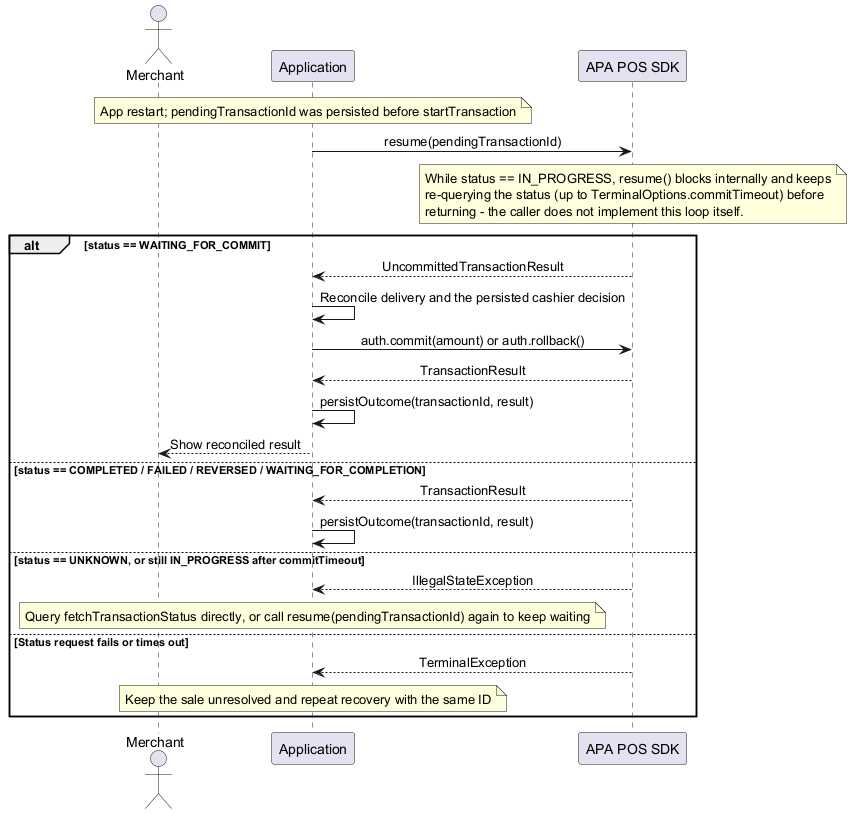
TransactionStep step = terminal.resume(pendingTransactionId);
if (step.getType() == TransactionStepType.AUTH) {
    AuthStep auth = (AuthStep) step;
    // Reconcile delivery and the persisted cashier decision before committing or rolling back.
    TransactionResult result = auth.commit();
    persistOutcome(pendingTransactionId, result);
} else {
    persistOutcome(pendingTransactionId, (TransactionResult) step);
}resume returns AuthStep for WAITING_FOR_COMMIT, and TransactionResult for COMPLETED, FAILED, REVERSED or WAITING_FOR_COMPLETION. An IN_PROGRESS or UNKNOWN state cannot be resumed as a decision or outcome, because the terminal is still processing the payment (e.g. card or host interaction) independently of the crashed/restarted application - there is no AuthStep or TransactionResult yet to hand back. Call resume(transactionId) again after a short delay (e.g. with exponential backoff) until it settles into one of the states above. Recovery does not reconstruct card details, approval codes or failure reasons that the status endpoint omits.
Reversal / Multiple Reversal
EP2 "Multiple Reversal" is exposed here as ReversalRequest.salesReversal(salesId) - see below.
startReversal reverses an already concluded transaction, identified by its transaction ID, via the terminal service's dedicated reversal endpoint. Build the request with ReversalRequest.reversal(transactionId) for the common case (reversing the terminal's last transaction):
ReversalResult reversal = terminal.startReversal(ReversalRequest.reversal(transactionId));
System.out.println("Reversed transaction " + reversal.getTransactionId());startReversal blocks the calling thread until the terminal answers. transactionId is also sent internally as this call's own correlation identifier - a reversal has no separate correlation id of its own, it is simply the transaction being reversed.
transactionId is always required for a plain reversal(...) - the backend still verifies it against the terminal's last transaction (and declines on a mismatch), it just never looks further back than that. There is no "reverse whatever the terminal considers current" call that skips supplying the original transaction's transactionId; keep it around (e.g. as returned/echoed by transactionStart) so you can reverse that specific transaction later.
Use ReversalRequest.salesReversal(salesId) for a Multiple Reversal - reversing every transaction tagged with a given salesId instead of one specific transactionId, only valid for Purchase/Funding/Load. Prepared ahead of backend support, not usable yet - the backend's ReversalRequestDto has no salesId/by-sale lookup at all, so startReversal throws TerminalUnsupportedOperationException for a salesReversal(...) request today; see TODO.md.
ReversalRequest salesReversal = ReversalRequest.salesReversal(salesId);
try {
    terminal.startReversal(salesReversal);
} catch (TerminalUnsupportedOperationException e) {
    // Expected today - the backend has no by-salesId reversal endpoint yet, see TODO.md.
    System.out.println("Multiple Reversal is not supported by the backend yet: " + e.getMessage());
}Manual PAN key entry (MPKE)
Every TransactionRequest.*Builder (except REVERSAL, which has no card-entry step) accepts a manually keyed-in card via manualCardEntry(pan, expiryDate, cvc2 = null) instead of reading the card at the terminal:
TransactionRequest request = TransactionRequest.purchase()
        .amount(new Amount(1000, "CHF"))
        .manualCardEntry("4111111111111111", "2612", null)
.build();pan and expiryDate (format YYMM) must be set together; cvc2 is only accepted alongside pan (it has no meaning without a manually entered card to belong to). Prepared ahead of backend support, not usable yet - the backend's terminal service has no matching request field today, so pan/expiryDate/cvc2 are accepted here but not forwarded onto the wire request at all; see TODO.md.
Early Check-in
Terminal.startCheckIn and CheckInResult.transactionStart are prepared ahead of backend support, so the shape is already stable once the terminal service gains a real startCheckout/finishCheckout wire contract. Not usable for a real payment today - transactionStart always throws TerminalUnsupportedOperationException.
Early Check-in pairs with the customer's payment app (via a QR code shown on the terminal) and collects loyalty card(s) before the actual payment amount is known - so it is a separate, two-stage flow instead of a TransactionType:
startCheckInpairs (a short simulated delay today) and returns aCheckInProgress.Once the ECR has scanned the products and the cashier pressed "checkout", call
checkout()- orabort()to cancel instead - to get aCheckInResult(scanned,loyalty). Currently both methods return placeholder data (scanned = false,loyalty = null).Once backend support is available, call
transactionStarton thatCheckInResult, now that the amount is known, to continue with the same staged flow described in #staged-payments (AuthStep/TransactionResult).
Java:
CheckInProgress progress = terminal.startCheckIn(correlationId);
// ...
CheckInResult result = progress.checkout(); // or progress.abort() to cancel

Amount amount = new Amount(1000, "CHF");
TransactionRequest request = TransactionRequest.purchase().amount(amount).build();
TransactionStep step = result.transactionStart(request);transactionStart throws IllegalStateException instead if called on a CheckInResult that came from abort() - the session is already concluded and cannot be continued.